Jurassic World™: The Game
- 4.3
- Rating
- 100.00M
- Installs
- Free
- Price

 Analysis by App-foxy
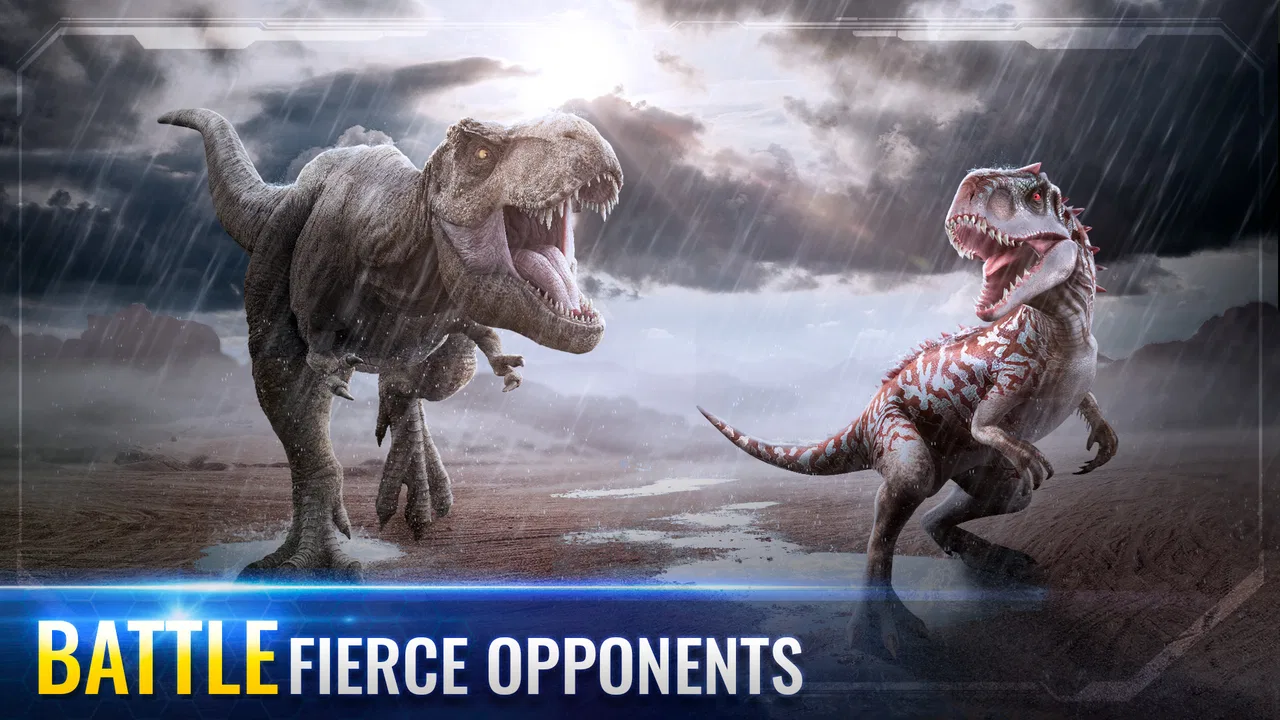
Jurassic World™: The Game is the kind of mobile simulation I open when I want a dinosaur-themed project that feels more involved than a quick arcade session. I build and manage a park, make choices about its creatures and development, and then move into battles when I want something more active. That combination gives the game a useful rhythm: planning when I have time, short encounters when I only have a few minutes, and longer stretches when I feel like improving the park.
What makes it worth considering is the way it combines management with recognizable Jurassic World presentation. It is not simply a dinosaur collection screen, and it is not a pure fighting game either. The appeal comes from switching between responsibilities, deciding what deserves attention, and gradually making the park feel more capable. I found that especially convenient on a phone because I could stop after a small task without losing the sense of progress.
It is also a game that asks for patience. Free access makes it easy to try, but the design includes reasons to return often and spend carefully. I would recommend it to players who enjoy long-term progression, creature development, and light strategy. I would be more cautious with anyone looking for a completely relaxed game with no waiting, no pressure to optimize, and no temptation to buy extras.
In-Depth Coverage of Jurassic World™: The Game
How the park feels to use on a phone
I find the phone experience works best when I treat each visit as a small planning session rather than tapping through every prompt. That makes it easier to keep the park’s many choices manageable, especially when I’m playing between everyday tasks. The next section looks at how that visual, tap-based approach shapes comfort and control in practice.
Readable menus and a navigation style built around visual choices
The main experience is strongly visual. I spend much of my time looking at the park, selecting creatures, checking available actions, and moving between management and battle areas. That makes the game approachable when the screen is easy for me to read, because the dinosaur theme and bright presentation help separate the major parts of the experience. The interface generally communicates that I am choosing between park work and creature-related activity rather than burying everything in text.
At the same time, a busy park can become visually demanding. As more objects and creatures appear, I need to pay attention to small controls and changing prompts instead of relying only on the scenery. On a phone held in one hand, this can make quick decisions less comfortable than they appear at first. I prefer playing with the display at a comfortable distance and taking a moment to confirm what I have selected, particularly when several actions are available.
One useful habit is to treat the park view as a planning screen rather than tapping every available item immediately. I first check what needs attention, then decide whether I am trying to improve resources, prepare a creature, or enter a battle. This reduces unnecessary movement through the interface and makes the game feel less frantic. It is a small change, but it matters for players who find rapid visual switching tiring.
The game comes from Ludia Inc. and sits in the simulation category, although its battles mean it does not behave like a quiet city builder. The simulation side is strongest when I am arranging my priorities and developing the park over time. The action side becomes more prominent when I enter confrontations. Players who need a very simple, single-screen experience may find this mixture less predictable than a traditional idle management game.
Text, color, and the importance of taking control of the pace
I found that the clearest way to play is to slow down during menus and speed up only when the choice is obvious. The game’s visual identity is part of its charm, but decorative elements can compete with practical information. If I am tired, distracted, or using a smaller phone, I am more likely to miss a useful prompt or tap the wrong area. That is not a deal-breaker, but it means the experience is more comfortable when I am not trying to play in a hurry.
For players who have difficulty distinguishing colors, I would not treat the visual presentation as automatically effortless. Dinosaur models and recognizable shapes help, but some decisions still depend on reading the screen and noticing visual differences. I recommend checking the interface during the opening sessions before committing to long play. If the labels and action cues are comfortable for you, the rest of the game becomes easier to manage; if they are not, the increasing number of choices may become frustrating.
There is also a practical difference between understanding a feature and using it efficiently. The game can make a new option look exciting, while the better decision may be to save attention for a creature or park task that supports your current goal. I learned to avoid treating every highlighted action as urgent. That approach helps players who need more time to process information and also helps anyone who wants to avoid impulsive choices.
Touch demands, timing, and sensory comfort
Most of my interaction is based on tapping and moving through screens rather than complicated controls. That is good news for players who prefer simple touch input, but it does not mean every session is physically effortless. Repeated taps, small buttons, and switching between areas can become tiring during a longer visit. I would play in shorter blocks if hand movement is uncomfortable, especially when the goal is routine park maintenance rather than a specific event.
Battle moments add a different kind of pressure. I need to pay attention to the opponent, choose actions, and think about the order in which I spend available options. The challenge is strategic rather than dependent on fast reflexes, which makes it more accessible to me than a game that demands constant swiping or split-second movement. Still, concentration matters. Someone who needs a low-stimulation activity may prefer the park-building side and avoid extended battle sessions.
You May Also Like

 Blood Strike: 2.5 Anniversary
Blood Strike’s Loadouts Turn Every Drop Into a Tactical Gamble
A close look at Blood Strike’s custom loadouts: how fast access to signature weapons reshapes its battle royale rhythm, rewards preparation, and narrows the gap between fights.

 Pandora - Music & Podcasts
Pandora’s Music Is Easy to Start, but Harder to Recover
Pandora’s strength is its low-effort path from a seed to a station. Its weak spot is how much confidence it asks you to place in connection, setup, and quiet recovery.

 8 Ball Pool
8 Ball Pool Is Built on Rivalries, Rematches, and Routine
A close look at the rivalries, rematches, shared routines, and unanswered safety questions that turn a quick pool match into a persistent mobile community.

 Samsung Music
Samsung Music’s Quiet Strength Is Playing What You Already Own
Its reach comes less from spectacle than from dependable access to a personal library. That simplicity is both the app’s strongest retention engine and its ceiling.

 AccuWeather: Weather Radar
AccuWeather Review: A Quick, Clear Forecast for Everyday Decisions
For everyday plans, the best forecast is the one you can understand quickly. AccuWeather makes rain timing, radar, and local conditions easy to act on, with a few trade-offs.

 Hill Climb Racing
Why Hill Climb Racing Still Turns Crashes Into One More Run
A tiny car, a bumpy hill and one more upgrade: Hill Climb Racing keeps resurfacing because its simple chaos makes every near-miss feel personal.
More From Our News Desk



The dinosaur theme also comes with strong visual drama. Creature animations, changing scenes, and the contrast between a peaceful park and a battle can make the game feel lively. That is enjoyable when I want entertainment, but it may be too stimulating in a quiet setting or late at night. I usually reduce the surrounding distractions and play with the phone at a moderate brightness. This is not a special feature of the game; it is simply the most comfortable way I found to handle its presentation.
Sound can be part of the atmosphere, but I do not think the game should be judged only with audio active. I often play with the phone muted when I am in public or when I want to concentrate on the visual decisions. The important information for my choices is primarily on screen. Even so, players who depend heavily on audio cues should try the game in their usual setup and confirm that the visual feedback is sufficient for their needs.
Short sessions, travel, and playing around an ordinary day
A realistic use case for me is playing during a commute or while waiting for an appointment. I can check the park, complete a small task, review a creature, and stop without needing to reserve an entire evening. That makes the game more flexible than a console-style adventure that expects long uninterrupted sessions. The same structure works during a lunch break, although I would avoid starting a battle if I know I may have to put the phone away immediately.
It is also suitable for players who like returning to a project several times throughout the day. The park gives me a reason to come back, while the simulation layer makes each visit feel connected to the last one. However, this rhythm can become a weakness if I prefer games that deliver all progress in one sitting. The experience is built around gradual development, so it rewards routine more than occasional bursts of play.
Because the game is free, it is easy to install and test without making an initial purchase. It is rated Teen, which is a useful signal for families deciding whether it matches the intended player. I would still look at the game together with a younger player rather than assuming the age label answers every question about comfort, attention, or spending habits. The dinosaur setting may look family-friendly, but the management and battle loop can be more involved than a simple children’s game.
The game has reached over one hundred million installs and holds an average rating of 4.2 from roughly two million ratings, so it clearly has broad appeal. Those figures tell me that the concept works for a large audience, but they do not replace a personal trial. A player who enjoys Jurassic World creatures and collection-driven progression may connect with it quickly, while someone who dislikes repeated resource decisions may not enjoy it even if the theme is familiar.
What the game asks from players who need a more predictable experience
The biggest barrier is not the basic touch control; it is the combination of visual density, ongoing decisions, and monetization pressure. I need to remember what I am working toward, notice which action is worthwhile, and resist spending simply because a shortcut is offered. That mental load is manageable for me in short sessions, but it can be tiring for players who want a clearly defined beginning and end to each play period.
In-app purchases range from ninety-nine cents to four hundred ninety-nine dollars and ninety-nine cents per item. That is a very wide range, and it changes how I think about the game even when I do not buy anything. I strongly recommend deciding on a personal spending limit before playing, especially if several people share a device or if a younger player has access to it. The free entry point is attractive, but the most comfortable experience requires self-control around optional purchases.
My practical approach is to separate entertainment decisions from progress decisions. If I want to play a battle because it is fun, I do that. If I feel tempted to buy something only because I am impatient, I close the purchase screen and return later. This simple pause prevents the game’s pace from controlling my budget. It also reveals whether I actually enjoy the underlying simulation or merely want to remove a delay.
Another limitation is that the game may not suit players who need a completely calm, low-choice interface. There are several layers to keep track of, and the most satisfying results come from learning how they relate. I would choose a simpler idle game for someone who wants to glance at a screen, collect a reward, and leave. I would choose this one for a player who likes having a small project to manage and does not mind learning through repeated visits.
How it compares with other simulation choices
Compared with a conventional city-building simulation, this game has a stronger creature focus and a more direct connection between park development and battles. That gives it more variety than a purely decorative builder, but it also means the experience can feel less peaceful. I am not only arranging a park; I am preparing creatures and making tactical decisions. Players who want constant construction may prefer a dedicated city builder, while dinosaur fans will likely appreciate this more specific purpose.
Compared with a collection game centered only on unlocking characters, the park adds context to the creatures. I feel that I am developing an environment rather than filling a list. The trade-off is that there are more things to monitor, and the progression can feel slower when I am trying to improve several areas at once. I get more depth than a basic collector, but I also have to accept more routine management.
Compared with a fast action game, the battles here leave more room for thought and less room for reflex-based play. That is one of the reasons I can recommend it to players who do not enjoy rapid controls. However, anyone seeking immediate action may find the park sections interrupt the excitement. The best match is someone who likes alternating between preparation and confrontation instead of demanding one style for the entire session.
Who I would recommend it to, and who should skip it
I would recommend it to a Jurassic World fan who enjoys seeing a themed park grow slowly and wants more involvement than a passive collection screen. It is also a good fit for simulation players who like making small decisions, returning regularly, and learning which improvements deserve priority. The fact that it is free makes experimentation straightforward, provided the player is comfortable with optional spending prompts.
I would be careful recommending it to someone who becomes frustrated by waiting, repeated tasks, or progress that feels easier when money is spent. I would also skip it for a player who wants a fully offline-feeling experience with no need to think about purchases or ongoing engagement. A more focused premium simulation may be a better choice for that person, even if it lacks the Jurassic World theme and creature battles.
For players with motor limitations, the relatively simple tap-based interaction is more inviting than a game built around complex gestures. The main question is endurance: repeated tapping and extended screen use may still be uncomfortable. For players with sensory sensitivities, the park management side is likely the gentler option, while battles and animated presentation may require shorter sessions. For players with reading or visual challenges, I would test the interface carefully before investing time, because the game relies on seeing and interpreting a busy screen.
My final view after settling into the routine
Jurassic World™: The Game works best when I treat it as a long-running hobby rather than a quick one-off game. Its strongest quality is the blend of park simulation, creature development, and tactical battles. I can play quietly for a few minutes, return later to make a larger plan, or focus on the dinosaur side when I want something more active. That flexibility makes it easy to fit around daily life.
Its weakest point is the pressure created by gradual progression and optional purchases. The game is free to start, but I need to manage my expectations and my spending. I also need to accept that a visually rich interface may not be comfortable for everyone, particularly during long sessions or on a small screen. Those are meaningful limitations, not minor details.
The current version is 1.87.6, and the game supports devices running Android 7.0 or later. For someone using an older device, checking compatibility before planning a long-term park is sensible. If the phone handles the experience comfortably and the Teen rating suits the intended player, I think this is a worthwhile simulation for dinosaur fans who enjoy gradual progress.
My inclusive verdict is simple: I would try it for the theme, stay for the mix of management and battles, and play with clear limits around time and purchases. It is not the most relaxing or universally accessible simulation, but it offers enough variety to reward thoughtful players. If you want a dinosaur park that feels active and strategic, this is a strong free starting point. If you want a quiet builder with no visual clutter or monetization pressure, I would look elsewhere.
FAQs for Jurassic World™: The Game
01What is Jurassic World™: The Game?
Jurassic World™: The Game is a mobile simulation game where players can build and manage their own Jurassic World theme park. You can collect and evolve various dinosaur species, engage in battles, and complete missions to improve your park. It offers an immersive experience with stunning graphics and engaging gameplay.
02Is Jurassic World™: The Game free to play?
Yes, Jurassic World™: The Game is free to download and play on both Android and iOS devices. However, it includes in-app purchases for various items and resources. While not necessary, these purchases can enhance your gameplay experience by speeding up progress or unlocking special features.
03What are the system requirements for Jurassic World™: The Game?
To play Jurassic World™: The Game, you need a compatible smartphone or tablet with Android 8.1 or higher, or iOS 11.0 or later. The game requires a stable internet connection and sufficient storage space for installation and updates. Ensure your device meets these requirements for optimal performance.
04How can I earn resources in Jurassic World™: The Game?
Resources in Jurassic World™: The Game can be earned through various in-game activities, such as completing missions, battles, and daily objectives. You can also collect resources from your park's attractions and dinosaurs. Strategic planning and regular play can maximize your resource accumulation without needing in-app purchases.
05Are there any tips for beginners in Jurassic World™: The Game?
For beginners, it's crucial to balance park development with dinosaur collection and evolution. Focus on completing missions for rewards and gradually upgrade your park facilities. Engage in battles to earn extra resources and experience. Joining an active community or forum can also provide valuable strategies and tips.
Pros
- Stunning graphics and dinosaur models.
- Engaging real-time battles.
- Variety of dinosaur species.
- Regular updates with new features.
- Interactive park-building element.
Cons
- In-app purchases can be pricey.
- Requires constant internet connection.
- Battery drains quickly during play.
- Long wait times for building upgrades.
- Limited offline gameplay options.

Jurassic World™: The Game
Gallery